
In today’s fast-paced, device-heavy work environments, choosing the right USB-C charger is no longer just about convenience—it’s about maintaining productivity, minimizing clutter, and eliminating power anxiety. Whether you’re working from home, traveling for business, or managing multiple devices in a hybrid setup, the USB-C charger has become the universal go-to for powering everything from smartphones to laptops.
But with options ranging from 20W to 140W (and beyond), the question remains: How many watts do you really need in a USB-C charger? This article breaks down power levels, device requirements, charging protocols, and user-specific scenarios to help you make the smartest choice.
Understanding USB-C Power Ratings: What Do the Numbers Mean?
Wattage is the first spec most users notice, but few understand its implications. A USB-C charger labeled “65W” doesn’t necessarily mean faster charging across the board—it depends on what you’re plugging in. Power is calculated using the formula W = V × A (volts times amps). For example, a charger that delivers 20V at 5A provides 100W.
Modern USB-C chargers that support USB Power Delivery (USB PD) often offer multiple voltage levels—5V, 9V, 15V, and 20V—to dynamically adapt to different devices. The higher the voltage and current, the more power the charger can deliver, but this must match what your device supports.
Device Power Needs: Matching Charger Output with Actual Demand
Smartphones
Most modern smartphones—including iPhones and flagship Androids—support fast charging in the 18W to 30W range. A 20W USB-C charger is usually sufficient for mobile-only users, though some Android models can draw up to 45W under specific conditions.
Tablets
Tablets, especially productivity-focused models with large displays, benefit from chargers in the 30W–45W range. Charging with anything lower may be functional but slow, especially during active use like video calls or design work.
Laptops
This is where wattage truly matters. Ultrabooks and lightweight laptops typically need between 45W and 65W. Power-hungry machines used for video editing or 3D rendering often require 100W or more. Using a lower-wattage charger may result in slower charging or even battery drain during use.
Small Devices
Earbuds, smartwatches, and other accessories typically draw less than 15W. While any USB-C charger can technically charge them, using a high-powered charger with no smart power regulation could lead to inefficiencies or unnecessary heat.
Real-World Scenarios: What Charger Wattage Fits Your Life?
To simplify the selection process, here’s a quick breakdown of suggested charger wattage based on common use cases:
| Scenario | Recommended Wattage | Notes |
| Remote work (laptop + phone) | 65W–100W | Dual-port chargers are ideal for simultaneous charging |
| Frequent business travel | 65W–100W (compact) | Prioritize portability and foldable plug design |
| Student or casual use | 30W–65W | Light, budget-friendly solutions suffice |
| Power users with multiple devices | 100W+ | Ensure support for dynamic power distribution |
Having a 100W charger doesn’t hurt if you occasionally charge high-demand devices, but for most everyday users, a 65W model offers a sweet spot between power and portability.
Is More Wattage Always Better? Common Misconceptions
A major myth in the fast-charging space is that higher wattage automatically equals better performance. Not necessarily.
Your devices will only draw the amount of power they’re designed to accept. Plugging a smartphone into a 100W USB-C charger doesn’t make it charge any faster than with a 20W model—unless the phone itself supports higher power input.
Additionally, higher-wattage chargers tend to be larger, more expensive, and may generate more heat. For small devices or minimalist setups, these trade-offs may not be worth it. The goal is not the highest number—it’s finding the right number for your device ecosystem.
Multi-Port Charging: Why Total Wattage Isn’t the Whole Story
Many USB-C chargers now feature multiple ports, but users often misinterpret the advertised “total wattage.” A “100W 4-port charger” doesn’t mean each port gives 100W.
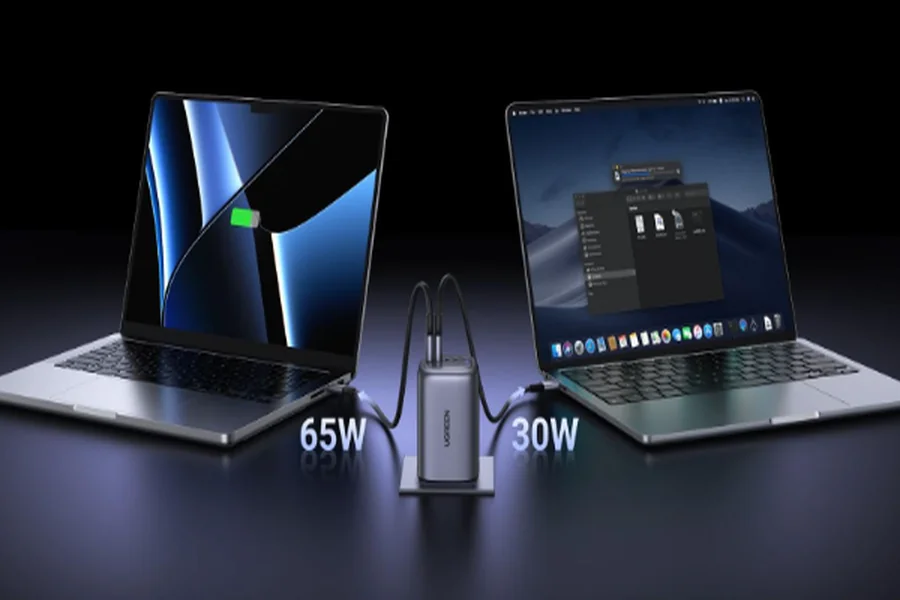
In practice, the charger splits its total output across devices—such as 65W to a laptop and 30W to a phone. Some advanced models feature intelligent power allocation, dynamically adjusting power based on real-time demand.
If you often charge multiple devices at once, ensure the charger supports sufficient per-port output, not just impressive total wattage on paper.
How to Choose the Right Wattage USB-C Charger for Your Setup
Here’s a checklist to guide your choice:
- List Your Devices: Identify the max charging power for your laptop, phone, tablet, and other gear.
- Consider Use Patterns: Are you charging one device at a time, or running a mobile office with everything plugged in?
- Check for PD/PPS Support: Fast-charging compatibility is essential for modern smartphones and laptops.
- Factor in Portability: For frequent travelers, size and weight may outweigh raw power.
- Think Ahead: Leave room for future devices—like upgrading from a 45W to a 65W laptop.
Don’t forget cable compatibility—using a low-quality or underpowered cable with a high-wattage USB-C charger can severely bottleneck performance.
Final Thoughts: Optimize, Don’t Overbuy
Choosing a USB-C charger isn’t just about future-proofing—it’s about right-sizing. A 100W charger might sound like the perfect all-in-one solution, but if your daily carry includes only a phone and earbuds, it’s overkill. On the other hand, trying to power a laptop with a 30W charger will only lead to frustration.
Evaluate your charging ecosystem, consider the trade-offs between power, size, and cost, and choose a USB-C charger that actually meets your needs—nothing more, nothing less. For expert recommendations and product insights, visit clover.